
Getting your OAuth Credentials
Find and securely use your OpenPath API Version 5 OAuth credentials to authenticate your application, request access tokens, and access protected endpoints. Credentials are unique to your merchant account and each Path setup, and must be stored securely.
Description
OAuth credentials are the secure keys used to authenticate your application when connecting to the OpenPath API Version 5. They allow your system to request access tokens, verify identity, and make authorized API calls safely and reliably.
For Version 5, OAuth is the standard authentication method and is required for accessing protected endpoints. Your credentials are unique to your merchant account and each Path setup within that Path and should be stored securely, as they are used to establish trust between your platform and OpenPath.
Where to Find the Credentials
-
Login to your merchant account at Merchant Portal
If you do not have an account, create an account as described here Create Free Account -
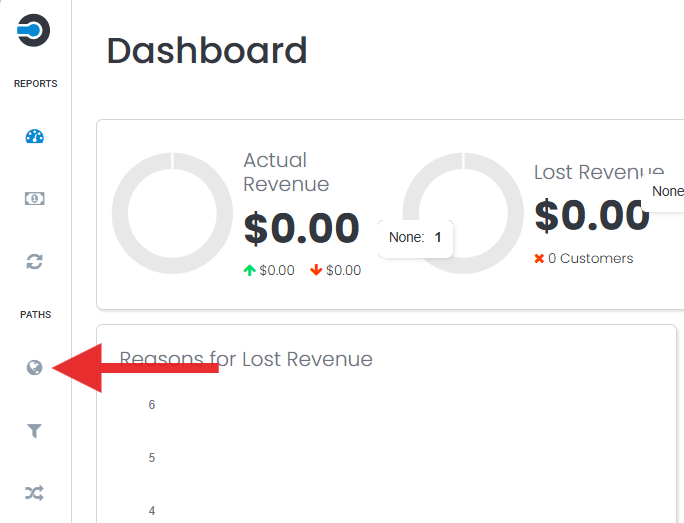
When logged in, navigate to the left menu bar and under Paths, select Sites Sites
-
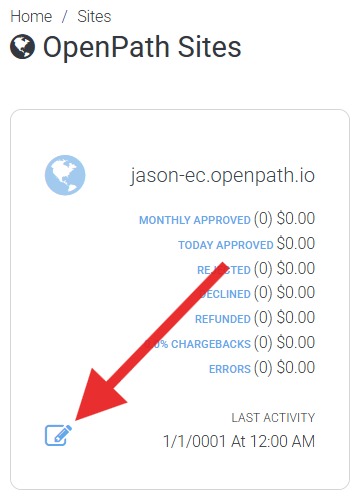
On the OpenPath Sites screen, choose the site you want to get your OAuth Credentials from by clicking on the edit Site icon
-
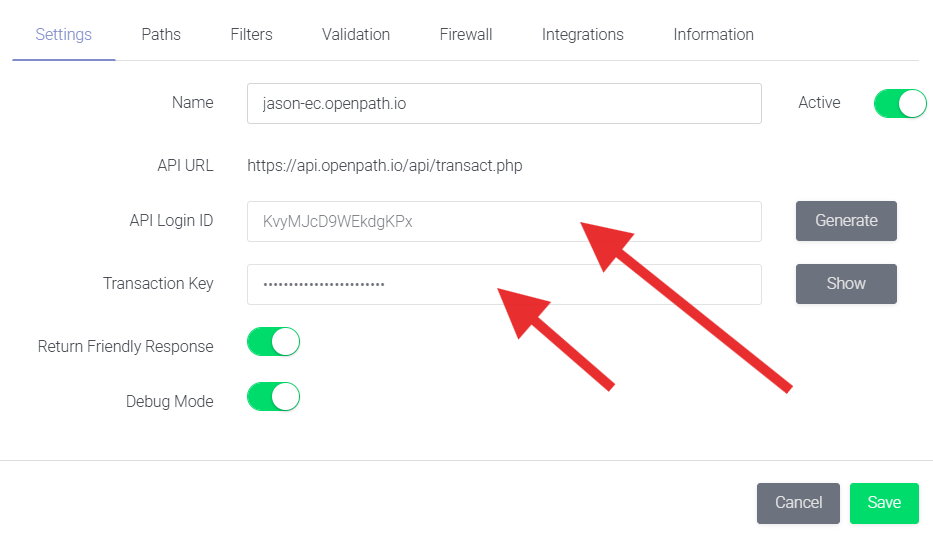
Next, you will already be on the Settings tab. Here, you will find your API Login ID (Username) and Transaction Key (Password), which are used to authenticate with our OAuth service and obtain an access token.
Quick Tip: Click directly on either text field to automatically copy the value to your clipboard.
Updated 2 months ago