
Path Designer
Visually explore, build and review transaction routing in the Enterprise Portal.
Beta: use at your own riskPath Designer is experimental. Incorrect changes can interrupt processing, reject payments or send transactions to an unintended connector. Test changes in a suitable non-production environment and review every affected site before applying. A beta acknowledgment is required on every visit.
Path Designer gives you a visual map of your organization's payment routing. Open Paths → Path Designer in the Enterprise Portal to see sites, the paths they use and their connectors in one diagram.
The diagram represents configuration, not a live animation of individual transactions. It helps you understand where traffic can go and change that configuration through a review-and-apply workflow.
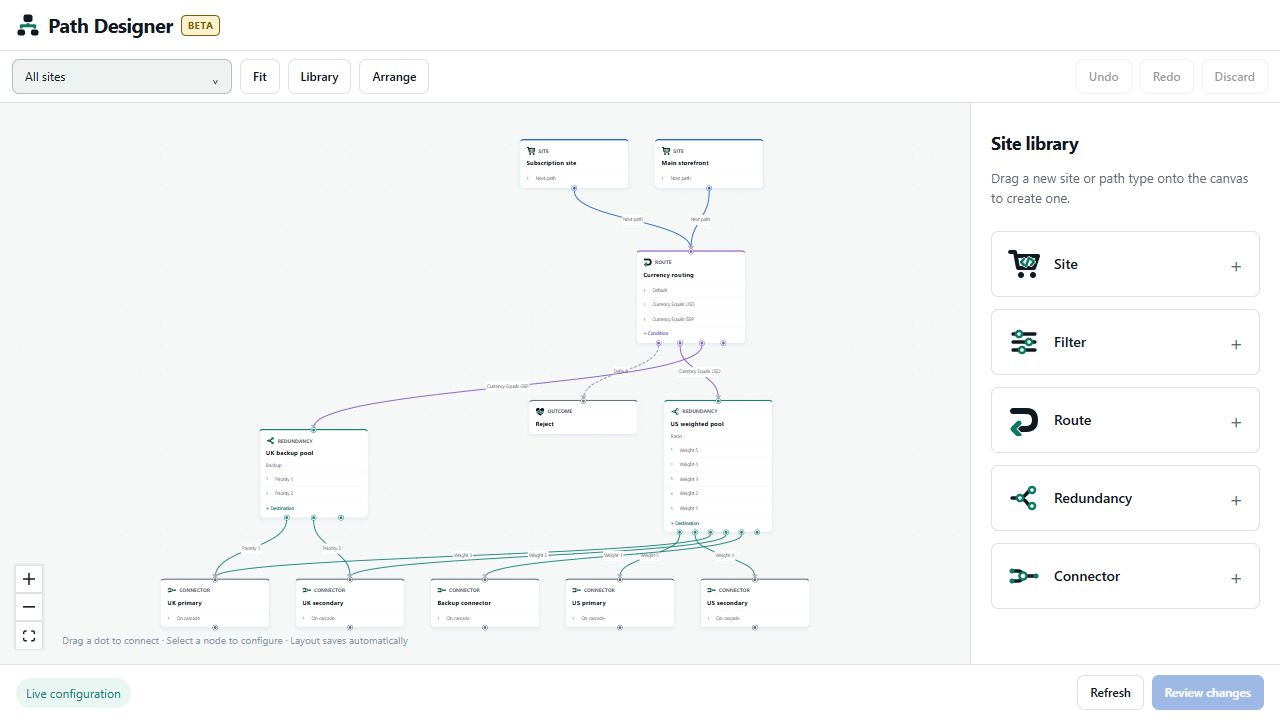
Screenshots in this guide use synthetic example configurations. Names, available fields and enabled features may differ in your organization.
How a transaction follows a path
A site is the entry point for incoming API traffic. Its Next path decides where processing continues. A simple configuration sends the site directly to a connector, which communicates with a payment provider. More complex configurations insert filters, conditional routes or redundancy paths before the connector.
For example:
- Main storefront sends traffic to Currency routing.
- A rule for Currency Equals USD points to US weighted pool.
- A rule for Currency Equals GBP points to UK backup pool.
- Each redundancy path selects a destination using its configured algorithm.
- A connector sends the transaction to its payment provider. Configured cascading may send eligible failures to another path.
A route can point to another route, filter, redundancy path or connector. Multiple sites can share the same path. A shared object appears once in the diagram, with multiple incoming connections.
Path types
| Type | Purpose |
|---|---|
| Site | Entry point for incoming traffic; has a Next path. |
| Filter | Applies configured checks and rejection rules before continuing to its Next path. |
| Route | Chooses a destination using conditions, with a Default path when no condition matches. |
| Redundancy | Selects among ordered or weighted destinations using a configured algorithm. |
| Connector | Communicates with a payment provider; can have a cascade destination. |
| Queue | An existing queue may appear in the map; its settings open separately. Queue creation is outside this Designer version. |
| Outcome / Reject | Ends a branch with a result such as Decline, Reject or Error. These are not approval destinations. |
Learn the workflow
- Getting started and navigating the canvas: access, beta warning, site selection, zoom, arrangement and personal layouts.
- Building and connecting paths: create nodes, connect handles, edit properties and remove connections.
- Routes and filters: conditional routing, default paths, filter behavior and scope.
- Redundancy and connector cascades: destination ordering, relative weights and fallback connections.
- Reviewing and applying changes: understand what saves immediately, review affected sites, resolve conflicts and apply.
- Troubleshooting and limitations: missing objects, session expiry, validation failures and uncertain saves.
Know what saves
Moving nodes and changing the view saves your personal layout automatically for your user and organization. Routing edits remain staged until Review changes → Apply routing changes. Site and connector setup dialogs save immediately, independently of the staged routing draft.
Read Reviewing and applying changes before editing shared routing. A change to one shared path can affect sites that are not currently selected in your view.
Updated about 1 hour ago